53%
Bounce rate on sites loading 3+ seconds
72%
Of home service searches happen on mobile
3x
More leads from optimized vs unoptimized sites
$42
Avg cost per lead (good site) vs $150+ (bad site)
Your contractor website is your most important salesperson. It works 24/7, handles hundreds of visitors at once, and never takes a sick day. But if it's not built right, it's actively turning customers away — and you may not even realize it.
The same problems show up on home service contractor websites again and again: slow load times, confusing layouts, missing trust signals, and weak calls to action. Whether you run an HVAC company, a roofing business, a plumbing operation, or an electrical contracting firm, every one of these issues costs you real leads and real revenue.
Here are the 7 most common signs your home service website is losing leads, and exactly how to fix each one.
Sign #1: Your Site Takes More Than 3 Seconds to Load
Speed is not optional. Google's own data shows that 53% of mobile visitors abandon a site that takes longer than 3 seconds to load. For a contractor running Google Ads at $30–$80 per click — whether you're advertising AC repair, roof replacement, drain cleaning, or panel upgrades — every abandoned visitor is money burned.
Slow sites also rank lower in search results. Google uses page speed as a ranking factor, so a sluggish site hurts you twice: fewer visitors find you, and the ones who do leave before calling.
The Real Cost
If your site gets 500 visitors per month and 53% bounce because of slow load times, that's 265 potential customers gone. Even at a modest 5% conversion rate, you're losing 13 leads per month. At an average ticket of $800, that's over $10,000 in lost revenue — every single month.
How to Check Your Speed
Go to Google PageSpeed Insights and enter your URL. You'll get a score from 0–100 for both mobile and desktop. Focus on the mobile score. That's where the majority of home service traffic comes from, regardless of trade.
Quick Fixes for Speed
- • Compress images — Use WebP format instead of PNG or JPEG. Most images on contractor sites are far too large.
- • Remove unused plugins — If you're on WordPress, deactivate and delete any plugin you're not actively using.
- • Enable caching — A caching plugin (like WP Rocket or LiteSpeed Cache) can cut load times in half.
- • Upgrade your hosting — Cheap shared hosting ($3/month plans) will never be fast. Budget $20–$50/month for quality hosting.
Sign #2: It Looks Broken on Mobile
Over 72% of home service searches happen on mobile devices. When someone's AC stops working in July, a pipe bursts at midnight, a storm tears off shingles, or a breaker keeps tripping, they grab their phone — not their desktop. If your site doesn't work perfectly on a phone, you're invisible to the majority of your potential customers.
Google also uses mobile-first indexing, which means it evaluates the mobile version of your site for ranking purposes. A desktop-only site will struggle to rank regardless of how good your content is.
Common Mobile Problems
Text Too Small to Read
If visitors need to pinch and zoom to read your service descriptions, they'll hit the back button instead. Body text should be at least 16px on mobile.
Buttons Too Small to Tap
Touch targets need to be at least 48x48 pixels. If your "Call Now" button is tiny, people will tap the wrong thing or give up entirely.
Horizontal Scrolling
Nothing says "unprofessional" like a site that scrolls sideways. This usually happens when images or containers don't resize properly on small screens.
Overlapping Elements
Menus covering content, images overlapping text, pop-ups that can't be closed. These issues make your site unusable and destroy trust before a visitor even reads a word.
How to Test Mobile
Open your site on your own phone. Can you read everything without zooming? Can you tap the phone number to call? Can you fill out the contact form easily? If the answer to any of these is no, your mobile experience needs work. You can also use Chrome DevTools (F12 → toggle device toolbar) to simulate different phone sizes.

Sign #3: No Clear Call-to-Action Above the Fold
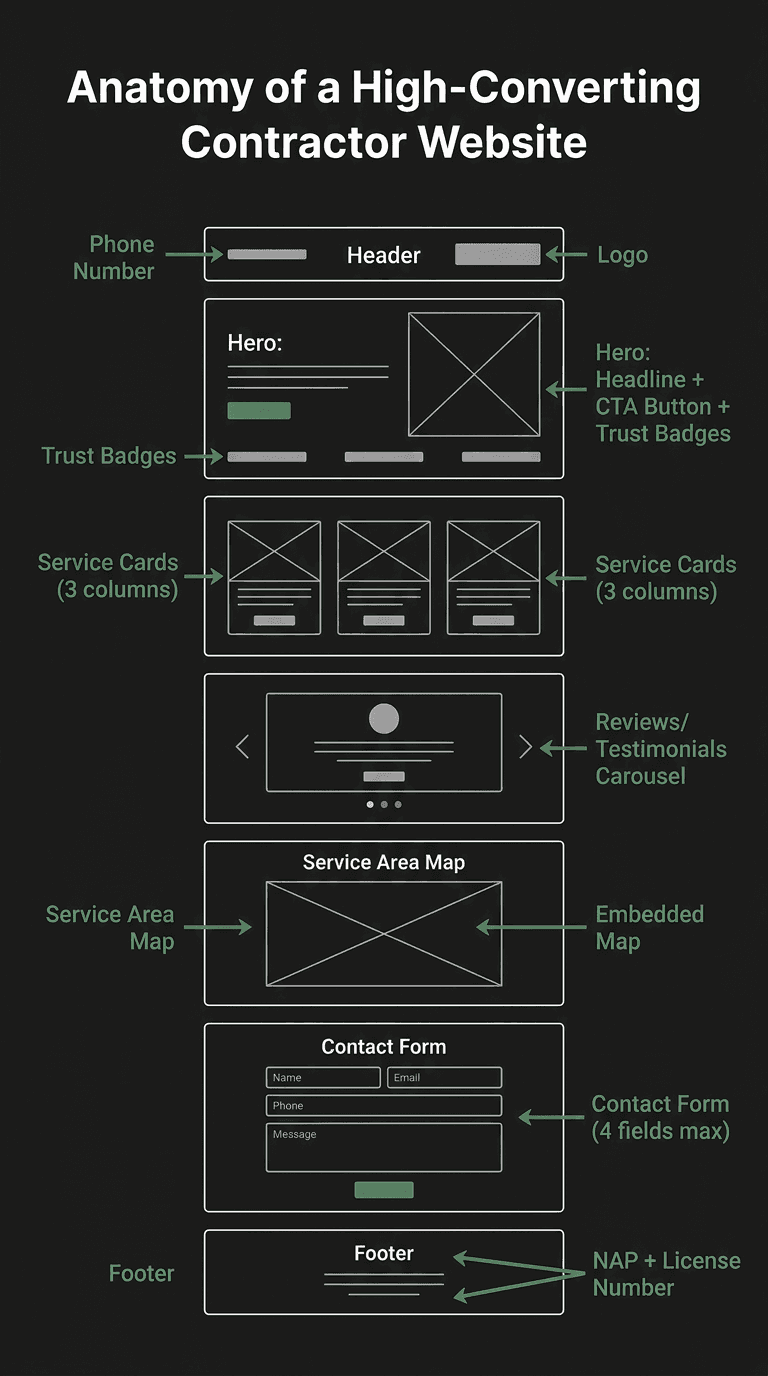
"Above the fold" means the part of your website visitors see without scrolling. This is the most valuable real estate on your entire site. If a homeowner lands on your homepage and doesn't immediately see how to contact you or what to do next, you've already lost them.
Too many contractor websites waste this space with generic stock photos, vague slogans like "Quality Service You Can Trust," or worse, a slow-loading image slider that nobody watches. Your above-the-fold area should answer three questions in under 5 seconds: What do you do? Where do you do it? How do I contact you?
What a Strong Contractor CTA Looks Like
Good CTAs
"Get a Free Estimate" / "Schedule Roof Inspection Today" / "Call Now for Same-Day Service" / "Book Your Plumbing Repair". Each one is specific, action-oriented, and tells the visitor exactly what happens next.
Weak CTAs
"Learn More" / "Submit" / "Click Here" / "Contact Us". These are vague and give the visitor no reason to act now. They create friction instead of urgency.
The Slider Problem
Image sliders (carousels) on your homepage are conversion killers. Studies show that less than 1% of visitors click on slides past the first one. They slow down your site, push your CTA below the fold, and distract from your main message. Replace sliders with a single strong hero section that has a clear headline and a prominent call-to-action button.
Sign #4: Your Contact Forms Are Too Long
Every extra field on your contact form reduces conversions. This is one of the most well-documented principles in web design, yet most contractor websites still ask for way too much information upfront. You don't need their mailing address, how they heard about you, their preferred appointment time, and a detailed description of their problem — not before they've even decided to work with you.
Research from HubSpot shows that reducing form fields from 4 to 3 increases conversions by nearly 50%. For home service contractors, the math is simple: the faster someone can request service — whether it's AC repair, a roof estimate, drain cleaning, or an electrical inspection — the more likely they are to do it.
The Only Fields You Need
- Name — So you know who you're calling back
- Phone number — The fastest way to close a home service lead
- Service needed — A simple dropdown tailored to your trade (e.g., for HVAC: AC repair, heating, maintenance; for plumbing: drain cleaning, water heater, leak repair)
- Zip code — To confirm they're in your service area
Pro Tip: Phone Number Is King
For home service leads, phone calls convert at 10–15x the rate of form fills. Make your phone number clickable on mobile, put it in the header of every page, and make it large enough to tap easily. The form is a backup for people who prefer not to call, not the other way around.
Sign #5: No Trust Signals
Homeowners are inviting you into their home. They need to trust you before they pick up the phone. If your website doesn't display proof that you're legitimate, licensed, and experienced, they'll choose the competitor whose site does — even if you're the better contractor.
Trust signals are the online equivalent of your branded truck, your uniform, and your business card. They tell the customer "we're real, we're professional, and we stand behind our work."
Essential Trust Signals for Home Service Sites
Google Reviews
Embed your Google review rating and count prominently. A badge showing "4.8 stars — 200+ reviews" is one of the most powerful conversion tools you can add, regardless of trade.
License Numbers
Display your state contractor license number in your footer and on your About page. This is legally required in many states for HVAC, roofing, plumbing, and electrical work, and it signals you're running a legitimate operation.
Insurance & Bonding
"Licensed, Bonded & Insured" badges give homeowners peace of mind that they're protected if something goes wrong during service.
Trade Certifications
NATE certification for HVAC, GAF or CertainTeed credentials for roofing, master license for plumbing, NECA or IBEW affiliation for electrical. Third-party endorsements carry significant weight.
Years in Business
"Serving [City] Since 2005" immediately communicates stability and experience. Newer companies can highlight total team experience instead.
Emergency Availability
A "24/7 Emergency Service" badge is a powerful differentiator for any trade — whether it's a mid-summer AC failure, a burst pipe, a storm-damaged roof, or a dangerous electrical issue.
Stock Photos Kill Trust
Using generic stock photos of smiling technicians that clearly aren't your team actually hurts credibility. Homeowners can spot fake photos instantly. Use real photos of your team, your trucks, and your completed work — a finished roof, a replaced water heater, a clean electrical panel. A slightly imperfect photo of your actual crew is 10x more effective than a polished stock image.
Sign #6: Thin or Missing Service Pages
If all your services are crammed onto a single page with a few bullet points each, you're leaving leads and rankings on the table. Google rewards pages that thoroughly cover a topic, and homeowners want to see that you genuinely understand their specific problem — not that you just listed it alongside 15 other services.
Each core service deserves its own dedicated page. When someone searches "roof replacement [your city]" or "drain cleaning [your city]," Google wants to show them a page specifically about that service in that area — not a generic services page with a brief mention halfway down.
What Each Service Page Needs
- Specific headline with the service name and your city (e.g., "Roof Replacement in Tampa, FL" or "Drain Cleaning in Tampa, FL")
- 300–500 words minimum describing the service, common problems you solve, and your process
- Pricing transparency — Even ranges ("starting at $89") help set expectations and pre-qualify leads
- A dedicated CTA specific to that service ("Schedule Roof Inspection" not just "Contact Us")
- Photos of your work for that specific service type
- FAQs answering common questions about that service
Pages to Prioritize by Trade
HVAC
AC repair, AC installation, heating repair, heating installation, and seasonal tune-ups. Then expand to duct cleaning, indoor air quality, and mini-split systems. See our HVAC marketing overview for more.
Roofing
Roof replacement, roof repair, storm damage repair, and gutters. Then add specialty pages for flat roofing, skylights, and insurance claims. See our roofing marketing overview.
Plumbing
Drain cleaning, water heater repair and replacement, leak detection, and sewer line services. Then add fixture installation, water softeners, and repiping. See our plumbing marketing overview.
Electrical
Panel upgrades, outlet and switch repair, whole-home rewiring, and EV charger installation. Then add generator installation, lighting design, and smart home wiring. See our electrical marketing overview.
Don't Forget Location Pages
If you serve multiple cities, create location-specific pages (e.g., "Plumbing Services in Brandon, FL" or "Roofing Services in Clearwater, FL"). Each page should include unique content about that area — not just the same text with the city name swapped out. Mention local landmarks, neighborhood characteristics, or specific challenges like older homes in historic districts. For a broader look at how other trades approach this, see our article on digital marketing for contractors.
Sign #7: No SEO Foundation
Your site might look great visually, but if the underlying SEO foundation is weak, Google has no idea what your pages are about or who they should show them to. SEO isn't about tricks or hacks. It's about making it easy for search engines to understand your business and match you with the right customers.
Many contractor websites we audit — across HVAC, roofing, plumbing, and electrical — have the same title tag ("Home" or the company name) on every single page, no meta descriptions, no header hierarchy, and no local business schema. These are foundational elements every page needs. For a look at how the broader contractor marketing landscape handles this, see our guide on roofing website design and our article on digital marketing for contractors.
The SEO Fundamentals Checklist
Title Tags
Every page needs a unique title tag with the primary keyword and your city. Format: "[Service] in [City] | [Company Name]" (e.g., "AC Repair in Tampa | ABC Heating & Cooling" or "Roof Replacement in Tampa | XYZ Roofing"). Keep it under 60 characters.
Meta Descriptions
Write a compelling 150–160 character description for each page. Include a call to action like "Call for same-day service" or "Free estimates available." This text appears in search results and directly affects click-through rates.
Header Structure (H1–H3)
Each page needs exactly one H1 tag with the main keyword. Use H2s for major sections and H3s for subsections. This helps Google understand the content hierarchy and improves accessibility.
Local Business Schema
Schema markup is structured data that tells Google your business name, address, phone number, service area, and hours. It's invisible to visitors but helps you appear in local search results and the Knowledge Panel — critical for every home service trade.
The Biggest SEO Mistake We See
Using the same title tag on every page (usually just your company name) tells Google that all your pages are about the same thing. Each page needs a unique, keyword-rich title tag. This single fix can dramatically improve your rankings within weeks, whether you're an HVAC contractor, roofer, plumber, or electrician.
Quick Win: Check Your Title Tags Right Now
Open your website and look at the browser tab for each page. If every tab says the same thing, your title tags need work. Or search site:yourdomain.com in Google to see all your indexed pages and their titles at a glance.
Self-Audit: Score Your Contractor Website
Go through each item below and give yourself one point for each one your website currently passes. Be honest. The goal is to find your weak spots so you can fix them.
- 1Speed: Your site loads in under 3 seconds on mobile (test at pagespeed.web.dev)
- 2Mobile: Your site looks and functions perfectly on a smartphone
- 3CTA: There's a clear, specific call-to-action visible without scrolling
- 4Forms: Your contact form has 4 or fewer fields
- 5Trust: You display reviews, license number, and insurance/bonding badges
- 6Service Pages: Each major service has its own dedicated page with 300+ words
- 7SEO: Every page has a unique title tag, meta description, and proper H1
Your Score
0–2
Urgent
Your website is actively losing leads every day. These issues are likely costing you thousands per month in missed opportunities. Prioritize speed and mobile fixes first.
3–4
Needs Work
You have a decent foundation but significant gaps remain. Focus on the items you missed. Each fix will have a noticeable impact on lead volume.
5–7
Solid Foundation
Your site is ahead of most home service competitors. Fine-tune the remaining items and focus on advanced optimizations like conversion rate testing and content expansion.
No matter where you scored, every one of these issues is fixable. Most contractor websites we audit — whether HVAC, roofing, plumbing, or electrical — score between 2 and 4, which means there's massive room for improvement. Even fixing one or two of these problems can lead to a measurable increase in leads. To see what a fully optimized home service web presence looks like in action, check out our case study where we generated $54K in new revenue for an HVAC contractor.