98%
Of consumers read reviews before hiring a home service contractor
4.5+
Star rating needed to get clicks in local search results
2x
Faster Map Pack ranking with steady review velocity
70%
More calls with 50+ Google reviews on your listing
Every home service contractor knows reviews matter. But most are still relying on the "hope and pray" method — finish a job, hand over a business card, and hope the customer remembers to leave a review. That approach gets you maybe 1 review for every 50 jobs.
The contractors dominating the Google Map Pack — whether they're HVAC companies, roofers, plumbers, or electricians — have a system. They're not asking more aggressively or hiring a PR firm. They're automating the entire review request process so it happens consistently after every single job, without anyone on the team having to think about it.
This guide walks you through building that system from scratch. The exact tools, templates, and trade-specific timing that turn happy customers into 5-star Google reviews — no matter what trade you're in.
We work with contractors across HVAC, roofing, plumbing, and electrical. The review generation principles are universal — but the timing and templates need to match your trade, and we'll cover both.
Why Reviews Are Your Best Marketing
Google reviews do four things that no other marketing channel can match. First, they're the strongest social proof available. When a homeowner sees 200 reviews averaging 4.8 stars, their decision is already half made before they ever visit your website.
Second, reviews are a direct ranking factor for the Google Map Pack. Google's algorithm weighs review quantity, quality, and recency when deciding which three businesses to show in local search results. A steady stream of fresh reviews signals to Google that your business is active and trusted. This is true whether you're an HVAC tech, a master plumber, a roofing crew, or a licensed electrician. If you're working on your local presence, reviews are the single most impactful element you can improve — more so than any other tactic covered in our digital marketing guide for contractors.
Third, reviews are a powerful trust signal that reduces friction at every stage of the buying process. Homeowners who see strong reviews are more likely to click your listing, more likely to call, and more likely to book without shopping around. That trust compounds over time — it lowers your cost per lead and raises your close rate.
Fourth, every review is free marketing content. Customers describe their experience in their own words, mentioning specific services, neighborhoods, and problems you solved. Those keywords help you rank for long-tail searches you never specifically targeted. It's organic SEO that writes itself.
1) Create Your Direct Google Review Link
The biggest barrier to getting reviews is friction. If a customer has to search for your business, find the reviews section, and then figure out how to leave one, most of them won't bother. You need a direct link that drops them straight onto the review form with the stars ready to click. Start by logging into your Google Business Profile to generate your shareable review link.
Log into Google Business Profile
Go to business.google.com and sign in with the Google account that manages your listing.
Find Your Review Link
Click "Ask for reviews" in your GBP dashboard. Google will generate a shareable link unique to your business.
Shorten the URL
The raw Google review link is long. Use a URL shortener like Bitly or create a custom short link (e.g., yourdomain.com/review) that redirects to the Google review form.
Test the Link
Open the link on your phone in an incognito window. Make sure it takes you directly to the review form with the star rating visible. If it asks you to log in or search for the business, something is wrong.
Create a Custom Redirect
Set up yourdomain.com/review as a redirect to your Google review link. This is easier to say over the phone, print on invoices, and include in text messages. Your web developer can set this up in minutes. If you don't have a site optimized for lead capture yet, that's a quick win worth addressing alongside your review system.
2) Choose Your Automation Tool
You can send review requests manually, but that defeats the purpose. The whole point is to make this automatic so it happens after every job without anyone on your team having to remember. Here are the main options for home service contractors:
Birdeye
Purpose-built for review management. Sends automated SMS and email requests, monitors reviews across platforms, and provides analytics. Integrates with most home service CRMs. Best for companies that want a dedicated review platform with detailed reporting.
Podium
Combines review requests with a full customer messaging platform. Great if you also want text-based communication with customers for scheduling and updates. The review request flow is smooth and gets high response rates across all trades.
NiceJob
The most affordable dedicated option. Simple setup, automated SMS and email sequences, and it can automatically share positive reviews to your social media. Good for smaller contractors that want a set-it-and-forget-it solution.
Your CRM (Built-In)
ServiceTitan, Housecall Pro, and Jobber all have built-in review request features. If you're already using one of these, start there. The integration is seamless since it triggers automatically when a job is marked complete — no extra setup required.
Our Recommendation
If you already use ServiceTitan, Housecall Pro, or Jobber, start with the built-in review request feature. It's included in your subscription, requires zero extra setup, and triggers automatically from your existing workflow. Only invest in a dedicated tool like Birdeye or Podium if you need advanced analytics or multi-platform monitoring.
3) Trade-Specific SMS Templates That Work
SMS review requests get 3-5x higher response rates than email. People read texts within minutes. But the message has to feel personal, not like a corporate mass blast. Keep it short, include the technician's or crew member's name, reference the specific work performed, and make the review link the easiest thing to tap.
The templates below are organized by trade. Each one references the specific job type to trigger the memory of a positive experience — the cold air coming back on, the leak gone, the lights working again.
HVAC
Hi [Customer Name], this is [Tech Name] from [Company]. Glad we could get your AC running again before the weekend! If you have 30 seconds, a Google review would mean a lot to our team: [review link]
Roofing
Hi [Customer Name], [Crew Lead Name] here from [Company]. The crew just finished your roof — thanks for trusting us with your home! If you're happy with how everything looks, a quick Google review helps us out: [review link]
Plumbing
Hi [Customer Name], this is [Tech Name] from [Company]. Glad we could take care of that [leak/clog/repair] for you today. If everything is running right, would you mind sharing your experience? Takes 30 seconds: [review link]
Electrical
Hey [Customer Name], [Tech Name] from [Company] here. Your [panel upgrade/outlet repair/installation] is complete and everything passed inspection. If you're satisfied with the work, we'd really appreciate a review: [review link] — means a lot to a local business.
Universal Template (Any Trade)
Hey [Customer Name], thanks for trusting [Company] with your [service]. If you have a minute, we'd really appreciate a Google review — it helps other homeowners find us: [review link] - [Tech Name]
Why the Technician's Name Matters
Including the technician's or crew lead's name makes the message feel like it's coming from a real person, not a bot. Customers who had a positive interaction are far more likely to respond when they see that person's name. Many reviews will even mention the tech by name, which adds valuable, keyword-rich detail to your review profile.
4) Timing by Trade
When you ask for a review matters almost as much as how you ask. The universal rule is to send within 1-2 hours of job completion — when the customer's experience is fresh and their gratitude is at its peak. But each trade has a natural "peak moment" that should drive the automation trigger.
HVAC — After the System Runs
Trigger the review request when the invoice is marked paid. The customer can feel the difference immediately — cool air in summer, heat in winter. That sensory payoff is your best moment to ask.
Roofing — After the Final Inspection Walkthrough
Roofing jobs can span days. Send the request after the crew lead completes the final walkthrough with the homeowner and the job is closed in your CRM. The homeowner has seen the finished product and signed off.
Plumbing — After an Emergency Fix
Plumbers often handle urgent calls — burst pipes, sewage backups, no hot water. Gratitude is highest right after relief. Send the request within 90 minutes of resolving an emergency call. For larger remodel jobs, trigger from project completion.
Electrical — After Panel Energization or Final Inspection
For panel upgrades and rewires, the emotional high point is when the power comes back on and everything works. Time your request to fire shortly after the permit inspection is passed or the final connection is made.
Universal Timing Rules
Avoid Early Mornings and Late Evenings
Even if the job was completed at 7 PM, schedule the text for the next morning around 10 AM. Nobody wants to write a review at 9 PM. Respect their time and you'll get better results.
Weekday Requests Outperform Weekends
People are more responsive to business-related texts during the workweek. If a Saturday job is completed, send the request Monday morning.
Never Ask Before the Job Is Done
Some systems send review requests the moment a job is scheduled or dispatched. This is a mistake. The customer hasn't experienced your service yet and can't leave an honest review. Worse, if something goes wrong during the job, you've already asked — and they might leave a negative one out of frustration. Always trigger requests from job completion or payment, never from scheduling.
5) The Follow-Up Sequence
Not everyone will leave a review after the first text. Life gets in the way. A gentle follow-up 3 days later can capture another 15-20% of customers who intended to leave a review but forgot. The key word is gentle. One reminder is helpful, two is pushy, and three is spam.
The Follow-Up Message
Hi [Customer Name], just a quick follow-up from [Company]. If you have 30 seconds, your review would really help us out: [review link]. No worries if not — we appreciate your business either way! - [Tech Name]
Notice the low-pressure tone. "No worries if not" removes any guilt and actually makes people more likely to follow through. If the customer doesn't respond to the follow-up SMS, you have one more option: a follow-up email 5-7 days after the job.
Email as a Backup Channel
Email has lower open rates than SMS, but it catches the customers who prefer not to respond to texts. Your email follow-up should include a brief thank-you, a single clear button linking to the review form, and optionally a photo of the completed work or the technician. Keep the email under 100 words. The goal is a quick tap on the review button, not a newsletter.
The Complete Sequence
Day 0 (1-2 hours post-job): SMS review request. Day 3: SMS follow-up reminder. Day 5-7: Email follow-up (only if no review received). After that, stop. Three touches is the maximum. Anything beyond that damages the relationship.
Responding to Reviews
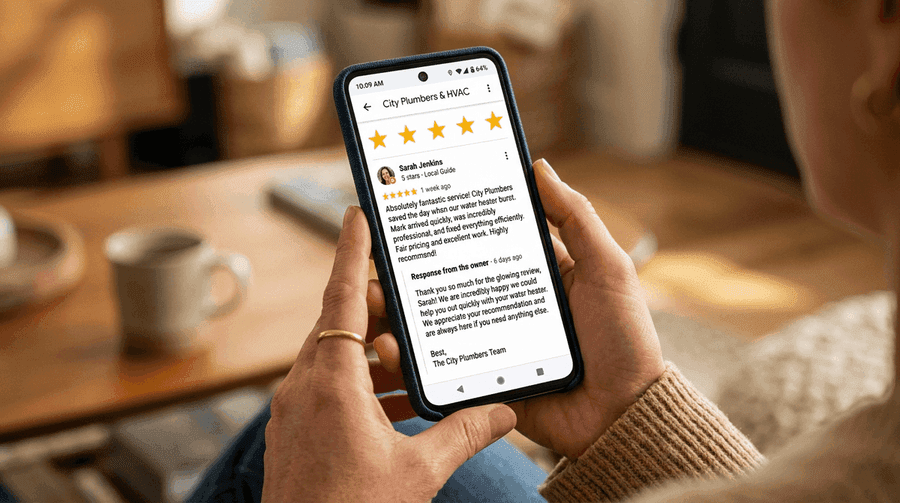
Getting reviews is only half the system. Responding to every single review — positive and negative — is just as important. Google confirms that responding to reviews improves your local ranking. It also shows potential customers that you care about feedback and are actively engaged with your business. This principle applies equally to HVAC companies, roofers, plumbers, and electricians.
Responding to Positive Reviews
Positive Response Template
"Thank you so much, [Customer Name]! We're glad [Tech Name] was able to [specific service] for you. We appreciate you taking the time to share your experience. If you ever need anything in the future, don't hesitate to call. - [Owner Name], [Company]"
Personalize every response. Mention the service performed and the technician by name. This adds keyword-rich content to your review profile and shows other readers that each customer gets individual attention — a signal that matters whether you're a solo plumber or a multi-truck electrical company.
Handling Negative Reviews
Negative Review Response Framework
Never argue, make excuses, or get defensive in public. Every potential customer reading that review is watching how you handle criticism. Follow this framework:
- Acknowledge: "We're sorry to hear about your experience."
- Take ownership: "This doesn't meet our standards."
- Move offline: "Please call us at [phone] so we can make this right."
- Follow through: Actually call the customer and resolve the issue. Many will update their review after a good resolution.
Handling Fake Reviews
Fake negative reviews happen across every trade. Competitors, disgruntled ex-employees, or people who confused your business with another one can all leave reviews you don't deserve. If you spot a fake review, respond professionally ("We don't have a record of this service. Please contact us so we can look into this."), then flag it through Google Business Profile by clicking the three-dot menu on the review and selecting "Report review." Google doesn't always remove flagged reviews, but they do investigate patterns. Document everything.
Measuring Your Review System
A review system without tracking is just guessing. You need to measure performance monthly so you can spot drops early and double down on what's working. Here are the four metrics that matter for any home service contractor:
- Reviews per month: Track how many new Google reviews you receive each month. A healthy contractor should aim for 8-15 new reviews per month. If you're getting fewer than 4, your system needs work.
- Average star rating: Monitor your overall rating weekly. Maintain 4.5 stars or above. If your average drops below 4.3, investigate immediately — there may be a service quality issue to address before it compounds.
- Response time: How quickly do you respond to new reviews? The goal is within 24 hours for every review, positive or negative. Set up Google Business Profile notifications so you're alerted the moment a new review comes in.
- Review-to-job ratio: Divide your monthly reviews by your monthly completed jobs. A ratio of 15-25% is excellent. Under 5% means your request system isn't reaching customers or the messaging isn't compelling enough.
Track these numbers in a simple spreadsheet or in your CRM's reporting dashboard. Compare month over month to see trends. If you notice your review-to-job ratio dropping, check that your automation is still triggering correctly and that your SMS templates haven't been flagged by carriers.
For a broader view of how reviews fit into your overall lead generation strategy, see our guide on digital marketing for home service contractors. If you're a plumber looking to grow beyond reviews, our local SEO guide for plumbers covers the full picture. Electricians can find trade-specific growth tactics in our electrician marketing guide.
Set a Monthly Review Goal
Start with a realistic target. If you complete 60 jobs per month and currently get 2 reviews, aim for a 10% review-to-job ratio first (6 reviews/month). Once your system is dialed in, push for 20% (12 reviews/month). Share the goal with your team. Technicians and crew leads who know the company is tracking reviews are more likely to deliver the kind of service that earns 5-star feedback.
Building a review generation system is not a one-time project. It's an ongoing process that compounds over time. The contractors with 300+ Google reviews didn't get there overnight. They built a system, ran it consistently for 12-24 months, and let the momentum carry them to the top of the Map Pack. Start today, and in six months you'll wonder why you didn't do it sooner.